Showing posts with label internet tips. Show all posts


Disable Copy and Paste Option

The popularity of blogging attracts lots of internet users to create blog for personal use or to add the websites of the company where he work. Some people are lazy in writing. So they search readymade content for his blog. Finally they copy the content from a blog and paste it in his blog. Its really hard to think and then write and some people, within minute copies the content and add it in his blog.

The readymade javascript code disable the selection option and not possible to select and copy the text. This way your text will be protected. I have mentioned below the step-by-step instruction to add javascript code in the blogger html template that will disable the selection option :

a) Login to your blogger account.
b) In the Dasboard, click on the Layout.
c) Click on Edit HTML in Layout.
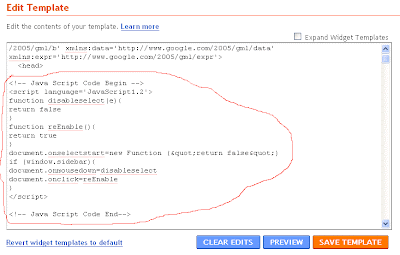
Paste the code given below between <head> and </head> :

<!-- Disable Copy and Paste-->
<script language='JavaScript1.2'>
function disableselect(e){
return false
}
function reEnable(){
return true
}
document.onselectstart=new Function ("return false")
if (window.sidebar){
document.onmousedown=disableselect
document.onclick=reEnable
}
</script>
<!-- Disable Copy and Paste-->

Save Template and open the blog in the browser and select the text. You will not able to select the text written in the blog.


Display Website Logo on the Address Bar

Have you seen a small icon in the address bar when you browse websites? And the icon definately attracts you and you want to know how the icon is in the address bar. I have seen lots of website including personal websites without icon. I know some of them are not very technical so they don't know how to add icon. I am writing how to display your website logo on the address bar for the non-technical website owner or the webmasters really have no idea to add icon in address bar.

For this, either you should own a website or you have the permission to upload the files of a website via ftp. If you have no idea to work on image editor then no problem you can take help from your friend. Also check whether you are able to save icon file with your image editor or not. The height and the width of the icon you see in the address bar should be 16 X 16. You have basic knowledge of html to add a meta tag in the page, if not then no problem, it is easy to learn. Here I am writing you very simple method to add icon. It can be uploaded in 2 ways. The easy way I am discussing here.

a) Create an image file, 16 X 16 (height=16 px and width=16 px) using image editor and save it as .ico file.
b) Upload icon file to the root or in the image folder. e.g http://www.mywebsite.com/mywebsitelogo.ico or http://www.mywebsite.com/images/mywebsitelogo.ico
c) Open html files one by one and insert the following code between and tags:

<LINK REL="SHORTCUT ICON" HREF="/images/mywebsitelogo.ico">

d) Upload the html files and check it in the browser.

display your web site logo on the address bar


Redirect Visitors to Your New Website - Internet Tips

Suppose you booked a new domain and want to continue your work on the new website and you also want to send all the traffic of your old website to new website. Here is a simple html meta tag that redirect the visitors to your new website. If you don't know html then just open the html pages of your old website and search <HEAD> and insert the meta tag written below between <HEAD> and </HEAD> like this :

<meta http-equiv="refresh "content="5;URL=http://www.mywebsitename.com/">

upload the page. In the delay time add 5 or 10 seconds and in the url, add the url of the home page of your new website.


How to Create Fake Adsense Report

Create Fake Adsense Screenshot - Internet Tips

Suppose if you want to create a fake report of your earning through google adsense and send it to somebody then how you do it. I know what you think? But it is the time wasting if you think about the adobe photoshop and print screen. I know what will you do? I know you open the photoshop and press the print screen button to take the snapshot of the earning report then paste it in the photoshop document and then edit the text value.

It takes 10-15 mins. But you can save your time and edit the text value without taking the snap shot of the page. After finishing the editing of the money value in your adsense account take a snap shot and save it as gif file and send it to the concerned person.

One line java script code will save your time and you do it in few minutes. Lets start :

1) Open the browser either internet explore or mozilla firefox.
2) Open google and through link go to the adsense account page.
3) Login to your account and select all time earning report.
4) Now paste the following code in the same address :
javascript:document.body.contentEditable='true'; document.designMode='on'; void 0
5) Click on any text in the page and type any word from the keyword. You will find the text of the page replaced by the word you typed.