The readymade javascript code disable the selection option and not possible to select and copy the text. This way your text will be protected. I have mentioned below the step-by-step instruction to add javascript code in the blogger html template that will disable the selection option :
a) Login to your blogger account.
b) In the Dasboard, click on the Layout.
c) Click on Edit HTML in Layout.
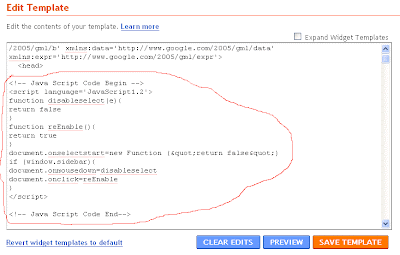 Paste the code given below between <head> and </head> :
<!-- Disable Copy and Paste-->
<script language='JavaScript1.2'>
function disableselect(e){
return false
}
function reEnable(){
return true
}
document.onselectstart=new Function ("return false")
if (window.sidebar){
document.onmousedown=disableselect
document.onclick=reEnable
}
</script>
<!-- Disable Copy and Paste-->
Save Template and open the blog in the browser and select the text. You will not able to select the text written in the blog.
